Stop C · Go somewhere
What do the numbers on a route mean?
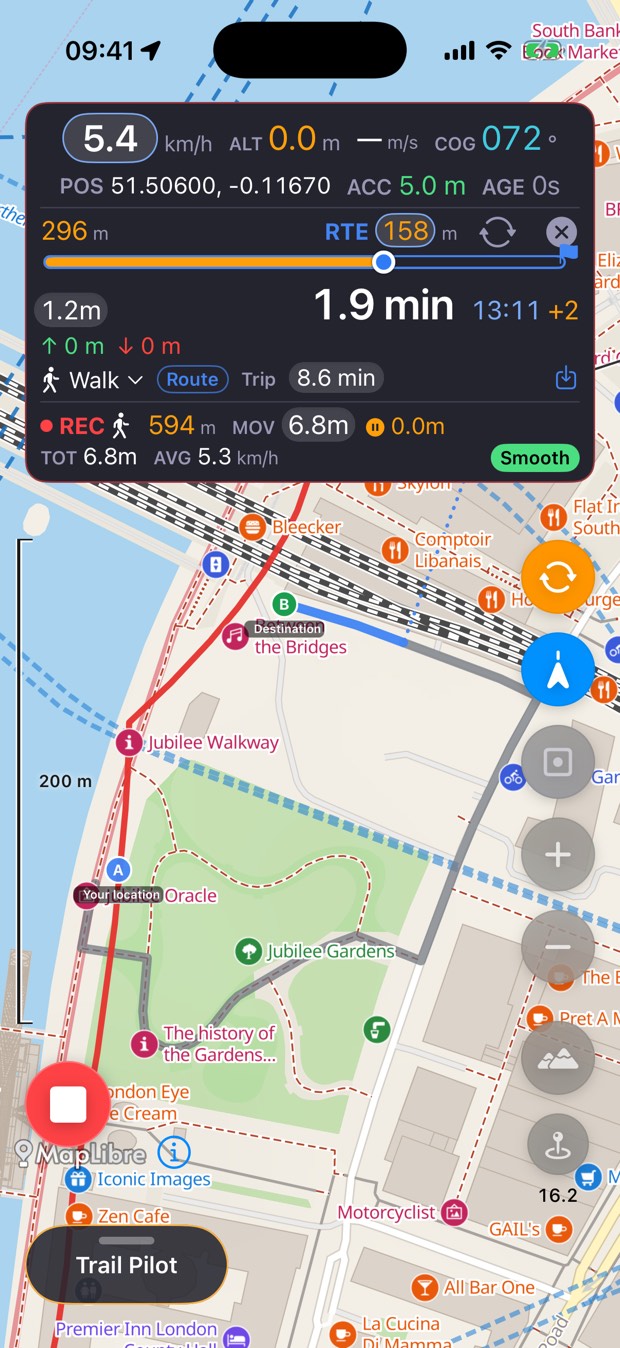
RTE is the distance to go. The big time is the time to go, and the clock time beside it is when you'll arrive.
With a route on the map, the top panel reads, from top to bottom:
- Left number: how far you’ve come on the route. RTE: how far is left.
- The bar: fills as you go. The flag is the end.
- The big time: time to go, at your pace. The clock time: when you’ll arrive.
- +2 (orange) or −3 (green): minutes later or earlier than the first estimate. Tap it to start counting again.
- ↑ ↓: the climb and drop still ahead.
- Walk ▾: how the route was planned. Tap it to change to Hike, Bike or Car.
Good to know
- Times like 1.8m are minutes, not metres.
- ↻ works the route out again from where you are now. ✕ removes the route.
- Press and hold the bar to restart its progress from where you are.
- Too much on the panel? Swipe it left to make it smaller, and right (or tap it) to bring it back.
- Every other label is explained in the panel decoder.
Send on WhatsApp timwestonapps.com/tp/panel
Did this help?
Checked on app version 1.0 (1)