Stop A · Record your first walk
How do I record a walk?
Tap the red button at the bottom left, choose Walk, and go. Tap it again to stop.
- Tap the red button at the bottom left of the map.
- Choose Walk. The others are Hike, Cycle, Drive, Train and Flight · Marine: pick the one closest to what you’re doing.
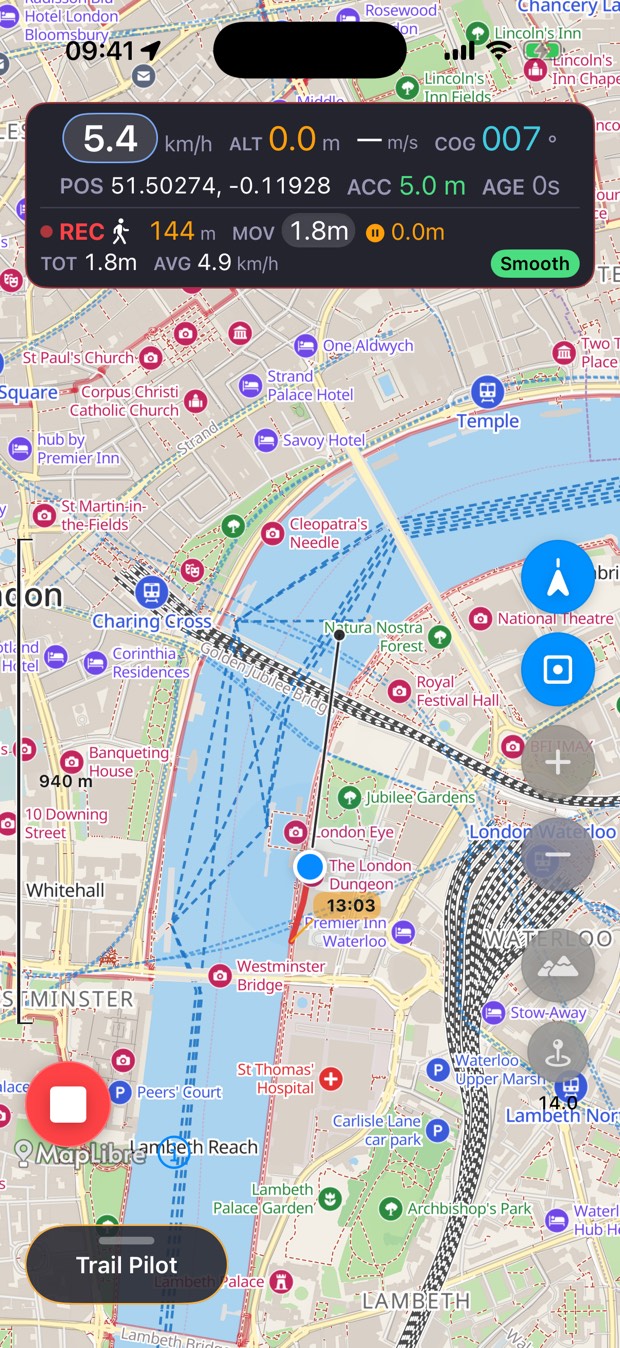
- Go. The top panel shows REC and how far you’ve come, and a line draws behind you.
- To stop, tap the red button again. It now shows a white square.
- Your walk is saved. To find it, tap the Trail Pilot box at the bottom of the screen, then Tracks.
Good to know
- It keeps recording with the screen locked or another app open.
- Stopped too soon? Tap the red button within 15 minutes and choose Resume Walk at the top. The same track carries on.
- Each activity records in the way that suits its speed, so a drive isn’t drawn like a walk.
On Android
The first time you record, Trail Pilot shows Keep recordings running. Some phones stop apps in the background to save battery. Follow the setting it shows (three on a Xiaomi), once, so a walk with the screen off isn't cut short. If Android asks to show notifications, allow it: the recording then shows in your notifications.
Send on WhatsApp timwestonapps.com/tp/record
Did this help?
Checked on app version 1.0 (1)